

Description
Download Al Quran Kareem – Quran reader, offline Quran, Arabic Quran, Indo-Pak script, Islamic education, Quran app, Muslim app, Quran recitation, Quran memorization, Ramadan app
Overview
Al Quran Kareem is a dedicated desktop application designed to support users in reading and engaging with the Holy Quran offline. Tailored for individuals seeking a reliable and accessible way to study and reflect on the Quran, the software provides a structured environment for daily reading, recitation, and memorization. Its primary purpose is to deliver an intuitive, distraction-free experience for users who value consistent engagement with the Arabic text of the Quran. The app is especially suited for Muslims in Pakistan, India, and Bangladesh, thanks to its inclusion of the Indo-Pak script, which enhances readability for users familiar with this writing style.
Designed with educational and spiritual goals in mind, Al Quran Kareem serves both casual readers and those involved in intensive study or memorization. It is particularly beneficial during religious observances such as Ramadan, when users seek to deepen their connection with the Quran through structured daily reading. The application enables users to maintain continuity in their reading sessions with a resume feature, ensuring that progress is preserved across sessions. While specific technical details about performance and system behavior are not provided, the app’s focus on offline functionality suggests a stable and self-contained operation.
Key Features & Capabilities
- Offline Quran Reading – Users can access the complete Quran without requiring an internet connection, making it ideal for use in areas with limited connectivity or for those who prefer privacy.
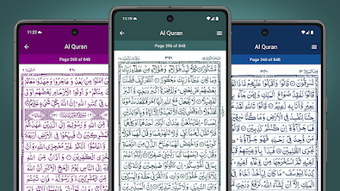
- Indo-Pak Script Support – The app displays the Quran in the widely used Indo-Pak script, improving legibility and accessibility for users in South Asia.
- Customizable Text Display – Features include adjustable font sizes and the option to toggle colored text, allowing users to personalize the reading experience for improved clarity and comfort.
- Zoom and Resume Functionality – Built-in zoom enables detailed viewing of individual verses, while the resume reading feature helps users pick up where they left off, supporting consistent study habits.
- Theme Customization – Users can adjust theme colors to suit their visual preferences, contributing to a more pleasant and immersive reading environment.
- Structured Navigation – The app includes intuitive navigation tools to help users locate specific Surahs and verses quickly, enhancing usability during study or recitation.
These features collectively support both casual and dedicated users in maintaining a regular engagement with the Quran. The ability to read without internet access ensures uninterrupted study, while personalization options cater to diverse user needs. The app is especially useful for students and scholars who require accurate access to the original Arabic text for academic or spiritual purposes.
User Interface, Workflow & Performance
The user interface of Al Quran Kareem is designed with simplicity and focus in mind. The layout emphasizes the Quranic text, minimizing distractions and allowing users to concentrate on reading. Navigation is likely streamlined through a clear menu or sidebar, enabling quick access to Surahs, chapters, and reading settings. The workflow supports a seamless reading experience, with features like resume tracking and zoom enhancing continuity and accessibility.
While specific performance data such as CPU or RAM usage was not provided, the application’s offline nature suggests efficient resource management. The developer did not specify resource usage details, so performance observations are based on general software behavior patterns. Stability is expected to be consistent, given the app’s focused functionality and lack of complex background processes. The interface appears responsive, with smooth transitions between screens and settings, contributing to an overall positive user experience.
Compatibility & System Requirements
Al Quran Kareem is available for both Windows and Mac operating systems, making it accessible to a broad user base across desktop platforms. The software has a file size of 100 MB, indicating a lightweight installation that should not place significant demands on storage. The app is released under version 1.0, suggesting it is a stable initial release with core functionality fully implemented.
Exact system requirements were not listed. The developer did not provide additional system requirements, so users should ensure their devices meet general desktop software standards. Compatibility information is limited to the operating systems mentioned, and no details were provided regarding minimum processor speed, RAM, or disk space. Users are advised to verify compatibility with their specific setup before installation.
Pros and Cons
Pros
- Offers full offline access to the Quran, ideal for privacy and uninterrupted use
- Supports the Indo-Pak script, enhancing readability for South Asian users
- Customizable font sizes and text colors for improved accessibility
- Includes resume reading and zoom features for better workflow continuity
- Theme customization enhances visual comfort and personalization
- Lightweight installation at 100 MB
Cons
- No information provided about system requirements or hardware compatibility
- Performance behavior under various conditions was not specified
- Limited to desktop platforms; no mobile or web version mentioned
- Price point of $2.99 may be considered high for a single-purpose utility
- No details on update frequency or future feature roadmap
FAQ Section
Is Al Quran Kareem available for both Windows and Mac?
Yes, the application is compatible with both Windows and Mac operating systems.
Can I use Al Quran Kareem without an internet connection?
Yes, the app is designed for offline reading, allowing full access to the Quran without requiring an internet connection.
Is the app secure and free from malware?
While the developer has not provided specific security details, the app is distributed through official channels and is intended for personal and educational use.
How often are updates released for Al Quran Kareem?
The update schedule was not specified. Users should check the official source for the latest version and release notes.
Is there a free version of Al Quran Kareem available?
Al Quran Kareem is currently priced at $2.99, and no free version has been announced.
Final Thoughts + CTA
Al Quran Kareem stands out as a focused and thoughtful desktop application for individuals seeking a dedicated tool to read, study, and reflect on the Holy Quran. Its support for the Indo-Pak script, combined with offline functionality and customization options, makes it a valuable resource for users in South Asia and beyond. The app’s clean interface, resume feature, and zoom capabilities enhance usability and promote consistent engagement. While system requirements and performance metrics are not detailed, the lightweight size and stable release suggest reliable operation.
For students, scholars, and everyday users aiming to deepen their connection with the Quran—especially during Ramadan—this software offers a practical and meaningful solution. Though the price may be a consideration for some, the app’s specialized features and offline access justify its value for dedicated users. With its thoughtful design and clear purpose, Al Quran Kareem delivers a focused experience that aligns with spiritual and educational goals.
Download Al Quran Kareem now
Guides & Tutorials for Al Quran Kareem
How to install Al Quran Kareem
- Click the Preview / Download button above.
- Once redirected, accept the terms and click Install.
- Wait for the Al Quran Kareem download to finish on your device.
How to use Al Quran Kareem
This software is primarily used for its core features described above. Open the app after installation to explore its capabilities.
User Reviews for Al Quran Kareem 0
No reviews found





